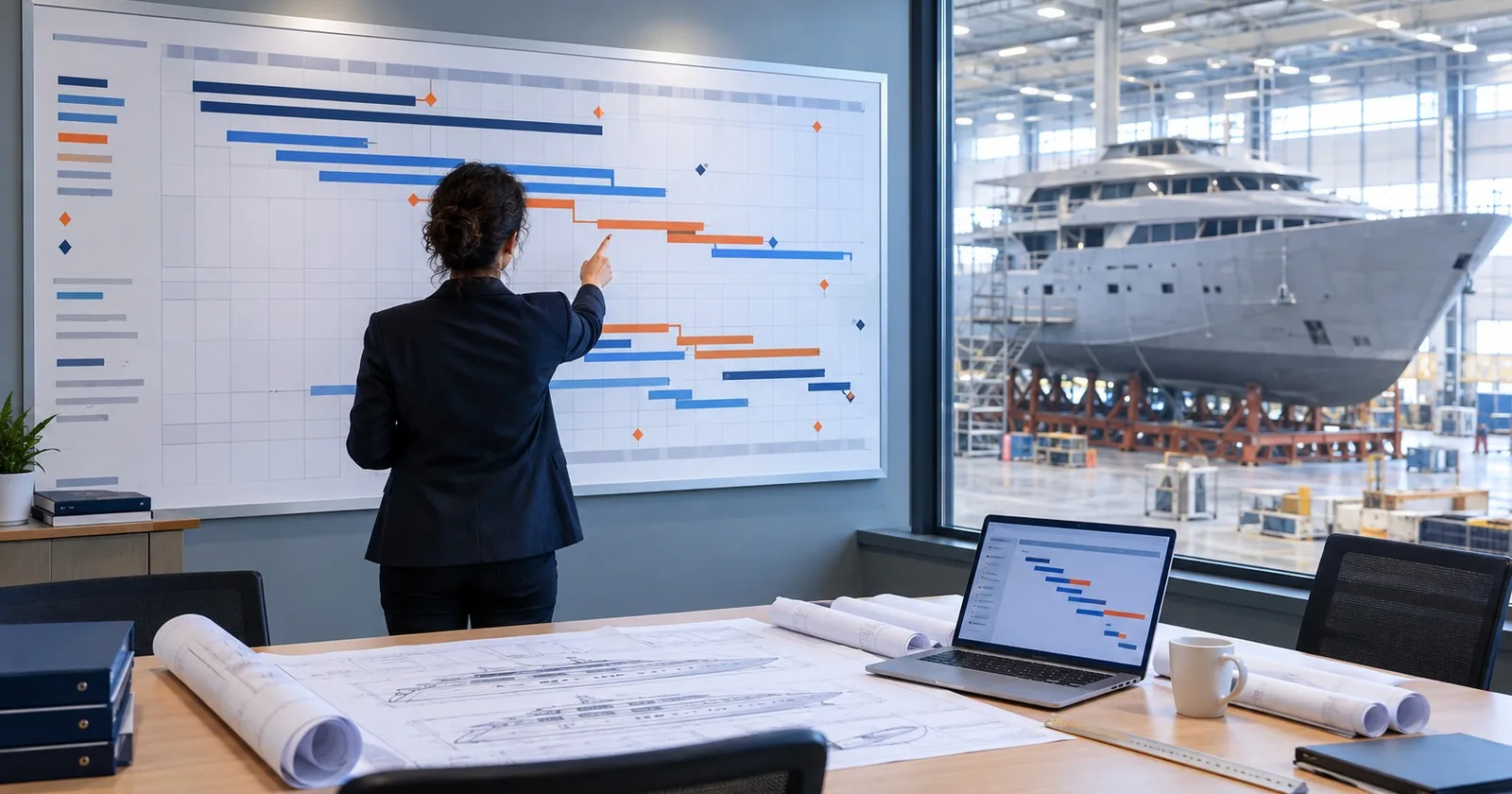
A 30-month master schedule for an illustrative 48 m yacht: WBS, milestones, long leads, the paint window, trials and MS Project setup, with templates.
A yacht master schedule answers the same question as any newbuild schedule: which chain of work decides the delivery date, and how much room is there around everything else? What changes on a yacht is where that chain runs. There is no series of sister hulls to learn from, the owner keeps making decisions well into construction, the exterior finish needs a protected window of its own, and the interior is a project in itself.
This lesson builds a 30-month master schedule for one illustrative yacht, from contract signature to delivery. It covers the work breakdown structure, the milestones, the long-lead packages, the paint window, commissioning and trials, and how to set it all up in Microsoft Project. The general method is not repeated here. If CPM, float or dependency types are new to you, start with Critical Path Method (CPM) Scheduling for Shipbuilding and How to Build a WBS for Shipyard Newbuild Projects, then come back.
At the end you can download the full schedule as MS Project XML and as an Excel workbook with a blank sheet and the worked example.
The illustrative project
Illustrative project: Project YP-48 is fictional. Its parameters are chosen from publicly reported industry ranges so the numbers are realistic, but no real yard, owner or yacht is described.
The parties are called the Yard, the Owner and the Design Studio; they are introduced in Anatomy of a Superyacht Newbuild, and the contract behind the milestones is reviewed in Reviewing a Yacht Yard House Contract. The parameters that matter for scheduling are these:
| Parameter | YP-48 value | Basis |
|---|---|---|
| Type | Full custom motor yacht | Illustrative choice |
| Length overall | 48 m | Many yachts designed to stay under 500 GT are reported to be around 45 m, with newer designs passing 50 m |
| Gross tonnage | Design target 499 GT | Reported industry practice of staying under the 500 GT threshold |
| Use | Private and charter (commercial use) | Illustrative choice |
| Guests | 12 | Upper limit for the REG Yacht Code Part A |
| Rule set | REG Yacht Code, Part A (July 2024 edition) | Part A applies to yachts of 24 m load line length and over, in commercial use for sport or pleasure, carrying no more than 12 passengers |
| Classification and flag | Lloyd's Register; Cayman Islands | Illustrative choices, see Rules Before Lines |
| Hull and superstructure | Steel hull, aluminium superstructure | Assumed for the example; see the note below |
| Contract to delivery | 30 months | Industry guides put superyacht build times at 24 to 48 months or longer |
| Interior outfitting | About 12 months | Reported range of 6 to 18 months |
| Payment milestones | 7, including contract signature | Six to eight payment stages are commonly reported |
Two notes on the table. The steel and aluminium combination is an assumption for the example; the lesson does not claim it is the norm for this size. And the contract value is not used anywhere in the schedule. Where the series needs money, it uses an index (contract price = 100), not a currency amount.
Nothing in the schedule depends on which classification society or flag is chosen, except the durations of plan approval, and those are shown as a single design task here. The logic is the same whichever combination the Owner selects.
What makes a yacht schedule different
A planner coming from commercial newbuilding will recognise most of the network. The differences are in weight and in where decisions come from.
One hull, many first-time decisions. Commercial yards often build series of sister ships, where durations on the third hull are informed by the first two. A full custom yacht has no such history, so early durations carry more uncertainty and should be reviewed more often.
The owner decides late. Interior layout, finishes, AV/IT and loose equipment can be decided well after contract. Each late decision has a date by which it must be made without moving the schedule. On a yacht, those decision dates belong in the schedule as tasks or milestones, not in a separate list.
Finish quality is a scheduling constraint. The exterior paint system on a yacht is a visible product, not only corrosion protection. That creates a window in which no welding, grinding or heavy work may happen near painted surfaces. The window has to be planned, protected and entered into the logic.
The interior is a parallel project. Joinery is often prefabricated away from the hull, samples and mock-ups go through owner approval, and installation runs alongside systems work in the same spaces. In the example below it sits one month off the critical path.
A work breakdown structure for a yacht
The existing WBS lesson builds a commercial newbuild WBS by level. For a yacht, the same principles apply, but the level 1 groups are arranged so that the owner-facing packages (paint, interior, AV/IT) are visible on their own and not buried inside "Production".
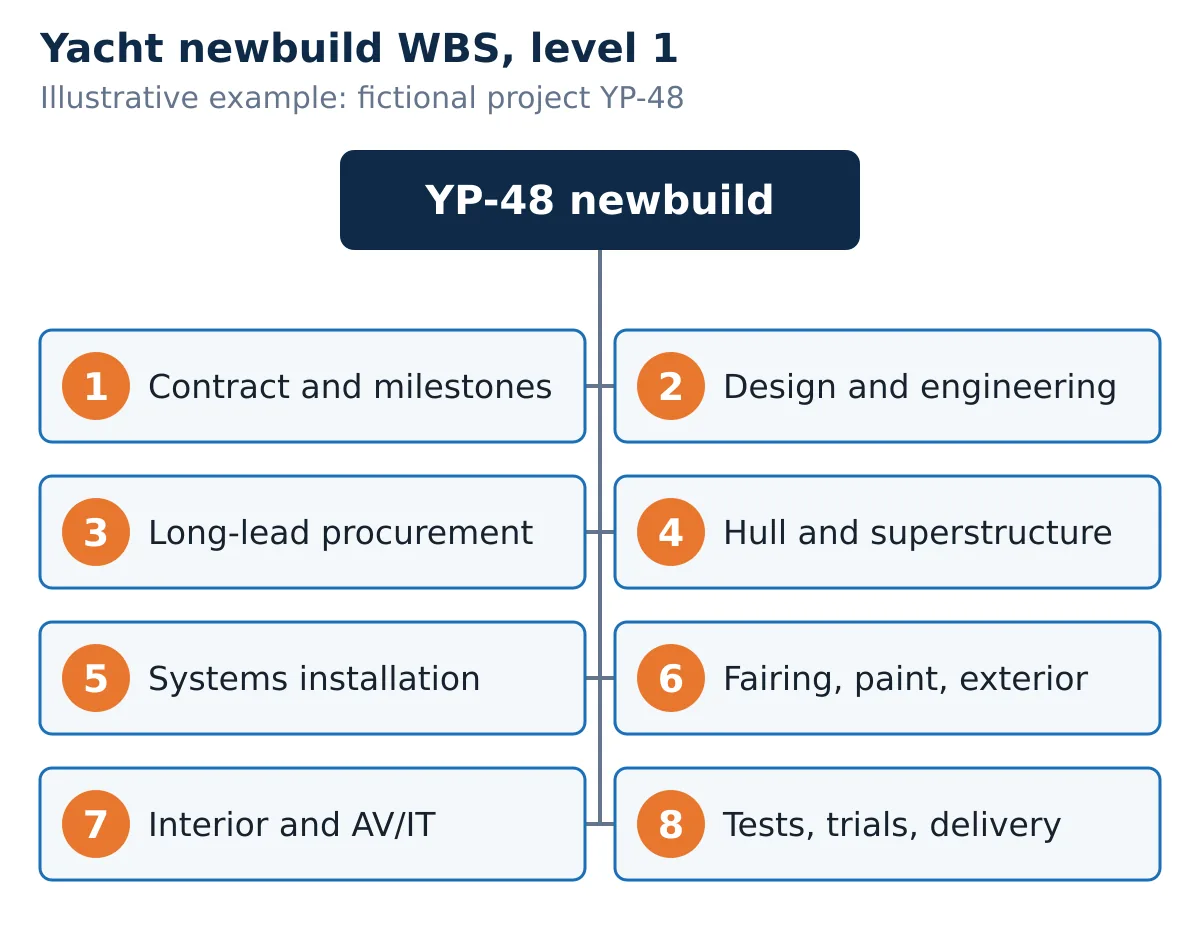
| WBS | Group | Examples of level 2 content in YP-48 |
|---|---|---|
| 1 | Contract and project milestones | Contract signature and the payment and physical milestones that are not tied to a single work group |
| 2 | Design and engineering | Basic design and class/flag plan approval, design freeze, detail and production engineering, interior detail design and sample approval |
| 3 | Long-lead procurement | Propulsion package, generator sets, stabilizers, glazing and exterior doors, interior joinery package, AV/IT and navigation |
| 4 | Hull and superstructure | Steel cutting, steel hull, keel laying, aluminium superstructure, joining |
| 5 | Systems installation | Main engine installation and alignment, generator and stabilizer installation, piping, HVAC, electrical and cabling, hot work complete |
| 6 | Fairing, paint and exterior | Fairing and exterior paint, exterior outfitting (glazing, teak, rails) |
| 7 | Interior and AV/IT | Interior outfitting, AV/IT installation |
| 8 | Commissioning, trials and delivery | Launch, commissioning and harbour acceptance tests, sea trials, punch list close-out and crew handover, delivery |
A few rules make this WBS work in practice.
Keep procurement as its own group. Each long-lead line runs from order to delivery at the yard. Installation sits in the group where the work happens. The link between the two is the point where a late delivery turns into a late installation, and you want that link visible.
Give each owner decision a home. Design freeze sits in group 2. Interior sample approval is part of the interior design task. When the Owner's representative asks "when do you need our decision on the saloon layout?", the answer should come from the schedule.
Keep level of effort out of the network. Project management, site supervision and owner reporting run for the whole project. They matter for cost and resources, but they have no logic of their own. Put them in the cost structure, not as tasks with links, or they will distort the critical path.
Number by the WBS, not by the row. The WBS code (for example 4.2 for the steel hull) stays fixed when rows are inserted. The row ID changes. Reports and meeting minutes should quote the WBS code.
For the commercial version of the same idea, including the link from WBS to bill of quantities, see Work Breakdown Structure (WBS) and Bill of Quantities (BOQ) in Ship Newbuilding Projects.
Milestones: physical, contractual and payment
A yacht schedule carries three kinds of milestones, and it helps to keep them apart.
- Physical milestones mark a state of the yacht: steel cutting, keel laying, hull and superstructure joined, hot work complete, launch.
- Contractual milestones are dates or events written into the contract: contract signature, sea trials complete, delivery.
- Payment milestones are the subset that trigger an instalment. On yacht contracts, six to eight payment stages are commonly reported, tied to events such as keel laying, completion of the superstructure, installation of the engines, finishing of the interior and exterior, and fairing and painting.
YP-48 uses seven payment milestones. Their months come straight out of the schedule logic:
| Milestone | Month | Type | Payment |
|---|---|---|---|
| Contract signature | 0 | Contractual | Yes |
| Start of steel cutting | 4 | Physical | No |
| Keel laying | 5 | Physical | Yes |
| Design freeze (GA and interior layout) | 7 | Owner decision | No |
| Main engines installed and aligned | 14 | Physical | Yes |
| Hull and superstructure joined | 16 | Physical | Yes |
| Hot work complete | 16 | Physical | No |
| Launch | 24 | Physical | Yes |
| Sea trials complete | 28 | Contractual | Yes |
| Delivery | 30 | Contractual | Yes |
No percentages are given here, on purpose. There is no standard split, and the split is a contract question, not a scheduling one. What the schedule must do is define each payment milestone precisely enough that everyone agrees when it has happened. "Main engines installed and aligned" is a better milestone name than "Engines", because it says what has to be true on the day. The difficulty of defining such milestones is covered in Milestone Payments in Superyacht Contracts.
One observation from the example: keel laying is not on the critical path. For a hull built upside down, keel laying is largely a ceremony, and in YP-48 it sits one month after the start of steel work with no work depending on it. It is still worth scheduling, because it is a payment milestone, but it tells you little about whether delivery is safe.
Class and flag survey points are milestones too. How to carry them in the schedule is covered in Managing Classification and Regulatory Milestones.
Long-lead packages
The long-lead group in YP-48 has six lines. Each is modelled as one task from order to delivery at the yard, linked to the installation task that needs it.
| Package | Ordered (month) | At yard (month) | Needed by | Float in the example |
|---|---|---|---|---|
| Propulsion package (main engines, gearboxes) | 1 | 12 | Main engine installation | 1 month |
| Generator sets | 2 | 13 | Generator and stabilizer installation | 1 month |
| Stabilizers | 2 | 13 | Generator and stabilizer installation | 1 month |
| Glazing and exterior doors | 7 (after design freeze) | 16 | Exterior outfitting | 9 months |
| Interior joinery package | 7 (after design freeze) | 14 | Interior outfitting | 2 months |
| AV/IT and navigation | 14 (after interior design) | 20 | AV/IT installation | 1 month |
The order-to-delivery durations in this table are placeholders. They were chosen to make the logic readable, not taken from any maker. Replace them with the maker's confirmed production slot and delivery date as soon as you have them.
The method for working out the latest safe order date, backwards from the date the equipment must be on board, is set out with a worked example in Procurement and Supply Chain for Major Ship Equipment. It applies unchanged to a yacht. What changes are the packages.
Design-driven orders. Glazing, exterior doors and the joinery package cannot be ordered until the layout is frozen. In YP-48 they are linked to the design freeze milestone, not to the contract. A late design freeze moves them, and the schedule will show it.
Decision-driven orders. AV/IT is linked to the end of interior detail design. In the example it has one month of float, so a late interior design decision reaches the AV/IT installation and, one month later, commissioning.
Equipment that meets the hull. Main engines, generator sets and stabilizers need both the equipment and a hull ready to receive it. The installation tasks in YP-48 have two predecessors each for that reason: the delivery and the relevant hull or structure task.
The small float values are not an accident of the example. With six long-lead lines and a 30-month programme, several of them will usually sit within a month or two of the critical path. Review their float every month and treat a shrinking value as an early warning.
The paint window
The exterior finish is where a yacht schedule differs most from a commercial one. Industry guidance on new-build paint work comes back to the same points: finish major construction, welding and hot work before the coating work starts; paint after the major installations; control temperature, humidity and dust in the paint area; allow curing time; and protect painted surfaces for the rest of the build.
For the schedule, those points turn into three things.
A hard hot-work cut-off. YP-48 has a milestone called "Hot work complete". Fairing and exterior paint cannot start before it. Its predecessors are the joining of superstructure and hull and the installation of generators and stabilizers, the last heavy structural work in the example.
A protected duration. The fairing and paint task runs for eight months in the example. That figure is illustrative, not a benchmark.
A rule for changes. A late change that needs welding on the exterior, such as a new hull opening or an added fitting, does not just add its own duration. It can reopen fairing and paint in that area. When pricing and scheduling an owner change, check whether it crosses the hot-work cut-off.
In YP-48, fairing and paint is on the critical path. It is linked finish-to-start to launch, together with piping, HVAC, electrical and cabling. The eight-month paint duration plus the hot-work cut-off at month 16 put launch at month 24.
Commissioning, harbour tests and sea trials
After launch, the schedule turns from building to proving. YP-48 has four tasks here:
- Commissioning and harbour acceptance tests (3 months), starting at launch and also waiting for AV/IT installation.
- Sea trials (1 month in the model), starting after harbour tests and exterior outfitting are both complete.
- Punch list close-out, final finish and crew handover (2 months), starting after sea trials and after interior outfitting is complete.
- Delivery, as a milestone.
The sea trial programme on a yacht typically covers thrusters, speed and endurance runs, manoeuvring, anchoring, shell doors, tender launch and recovery, stabilizers and noise and vibration measurements. The one-month duration in the model is a container for the trials, the rework between trial days and the paperwork. It is not a statement about how long trials take. The commercial equivalent, including acceptance and the delivery protocol, is covered in Sea Trials and Delivery: Closing Out the Newbuild.
Two practical points for the schedule:
- Give the punch list its own duration. A delivery milestone placed directly after sea trials looks shorter on paper and is almost never met.
- Crew familiarisation needs the systems running. In YP-48 it sits in the last task, after sea trials, not in parallel with commissioning.
The critical path in YP-48
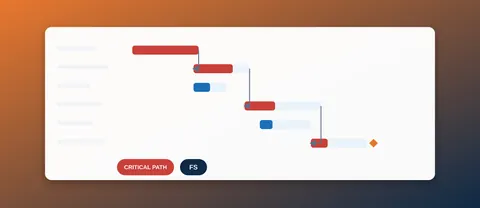
Put together, the 32 tasks and 43 links give this picture at phase level:
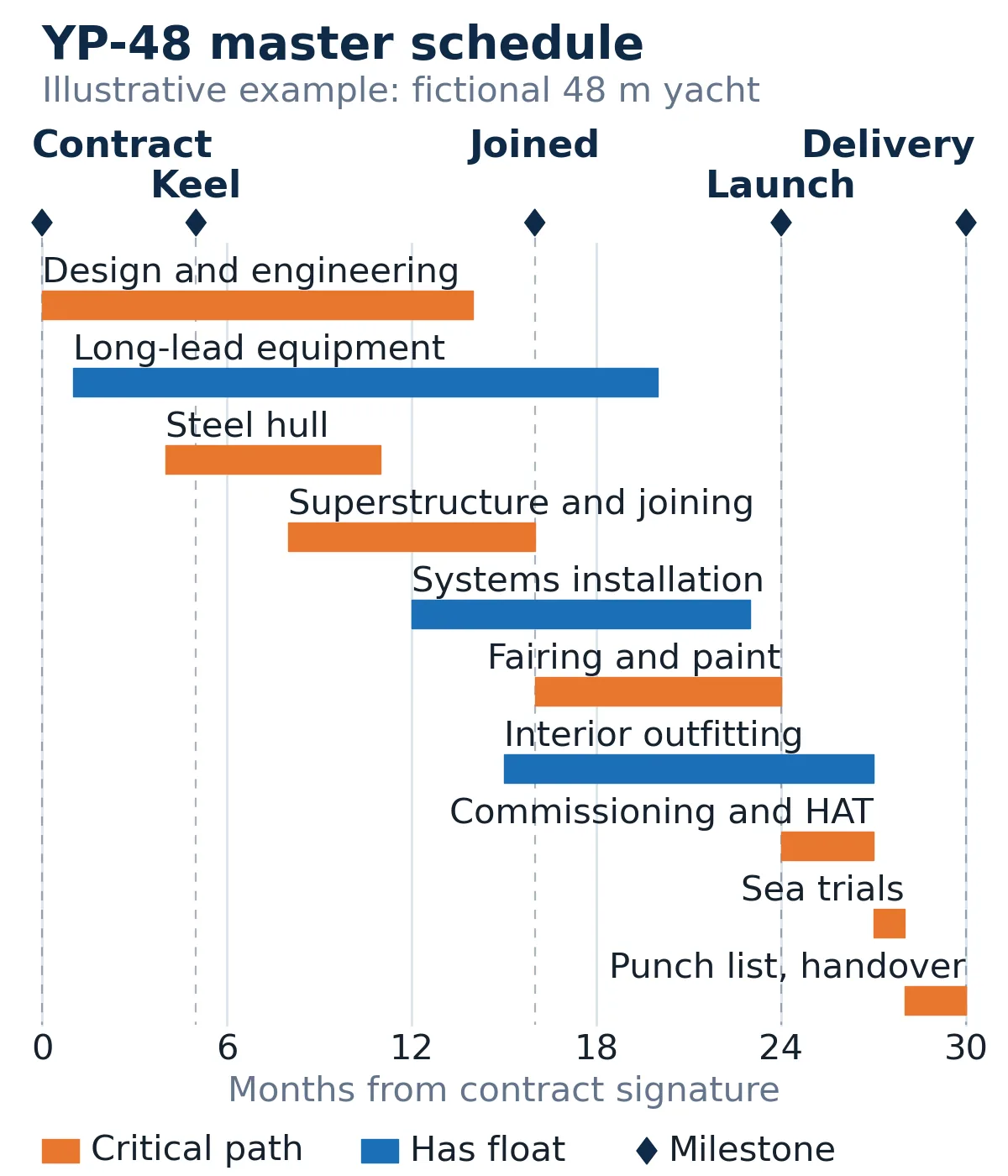
The critical path in the example runs as follows:
- Contract signature (month 0)
- Start of basic design and class/flag plan approval, which releases detail and production engineering two months later (start-to-start)
- Start of steel cutting at month 4, two months after production engineering starts (start-to-start)
- Steel hull construction, months 4 to 11
- Aluminium superstructure, months 8 to 15, starting four months after the hull (start-to-start)
- Joining superstructure to hull, month 15 to 16
- Hot work complete (month 16)
- Fairing and exterior paint, months 16 to 24
- Launch (month 24)
- Commissioning and harbour acceptance tests, months 24 to 27
- Sea trials, months 27 to 28
- Punch list close-out and crew handover, months 28 to 30
- Delivery (month 30)
Just as instructive is what sits one month off that path:
- Generator sets and stabilizers, through their installation to the hot-work milestone.
- Propulsion, through main engine installation to systems installation.
- Piping, HVAC, electrical and cabling, which must finish before launch.
- Interior outfitting, which must finish before the punch list starts.
- AV/IT, from order through installation to commissioning.
- Exterior outfitting, which must finish before sea trials.
In this example, six paths sit one month away from the critical path. That means the critical path can move. A slip of up to one month in interior outfitting uses up its float; anything longer moves delivery, and the critical path then runs through the interior. That is why the critical path has to be re-read at every update, not only at baseline.
Note also the design phase. Its start is critical, because steel cutting is tied to it by start-to-start links, but its finish has float. This is normal on a yacht: construction starts while engineering is still running. The risk is that later drawings change work already built. Track drawing approval against the construction tasks that consume it.
Setting it up in Microsoft Project
The download at the end contains the complete YP-48 schedule as MS Project XML. If you prefer to build it yourself, or want to adapt it to your own yacht, these are the steps that matter most. The general mechanics are covered in Introduction to MS Project for Shipyard Schedulers.
- Set the project start date and calendar. In Project Information, enter the contract date as the start date. Use your yard's working calendar, with holidays and shutdowns, not the default.
- Decide what a month means. Project converts months to working days using the "Days per month" setting in the calendar options (the default is 20). The YP-48 file uses 22. If you enter durations in months, check this setting first, or enter durations in weeks or days instead.
- Switch new tasks to Auto Scheduled. Manually scheduled tasks ignore links.
- Enter the WBS summaries first, then indent the tasks under them. Keep summary tasks free of links; link the detail tasks.
- Enter milestones as zero-duration tasks. Name them for the state they describe.
- Enter the links, including overlaps. A start-to-start link with a lag, such as "4SS+2 mo", is how the design and steel work overlap in YP-48. The four link types and lag are explained in Task Dependencies in MS Project.
- Use a deadline, not a constraint, for the contract delivery date. A deadline marks the date on the Gantt chart and warns you when the finish moves past it, without overriding the logic. A "Must Finish On" constraint hides the real slippage. See Task Constraints in MS Project.
- Show the critical path and total slack. Turn on Critical Tasks in the Gantt chart format options and add the Total Slack column. Filter for slack below one month to see the near-critical paths described above.
- Set a baseline when the schedule is agreed, and do not overwrite it. Views, baselines and progress reporting are covered in Getting Started with MS Project for Shipbuilding Schedules.
To open the XML file: in Microsoft Project, choose File > Open, set the file type to XML Format, select the file, and import it as a new project. Project recalculates all dates from the links and your calendar on import, so the dates you see depend on your settings. The file is MS Project XML, not an .mpp file.
A note on scale. YP-48 has 32 tasks, which is a master schedule for owner reporting and for testing the logic. A production schedule for the same yacht will have far more lines. Keep the master schedule as a summary layer, linked to the detailed schedule by WBS code, rather than growing it until nobody outside planning can read it.
Reviewing a yacht master schedule
Whether you are the Yard's planner or the Owner's representative reading the Yard's schedule, these checks catch most problems:

- Every owner decision (layout freeze, sample approvals, AV/IT specification) appears as a task or milestone with a date.
- Every long-lead line is linked both to its trigger (contract, design freeze, interior design) and to the installation it serves.
- There is a hot-work cut-off milestone, and fairing and paint cannot start before it.
- Payment milestones are named for a verifiable state of the yacht.
- The punch list and crew handover have their own time before delivery.
- The delivery date is a deadline, not a hard constraint.
- Level-of-effort work (management, supervision) is not linked into the network.
- The near-critical paths are listed, with their float, in each monthly report.
Download the templates
Two files accompany this lesson:
- Yacht Master Schedule, MS Project XML (zip). Unzip it to get
yp-48-yacht-master-schedule-ms-project.xml, the full YP-48 example: 8 WBS groups, 32 tasks, 43 links, 10 milestones. Open it in Microsoft Project via File > Open (file type XML Format). It is not an .mpp file. - Yacht Master Schedule, Excel workbook. A "Blank" sheet and an "Example (YP-48, illustrative)" sheet, each with a month-by-month bar chart that redraws as you edit start and duration. Excel does not recalculate dates from the predecessor column; the XML file does that in Microsoft Project.
For a commercial newbuild, the Newbuild Master Schedule Template (Gantt) covers the same ground with a ship-oriented WBS.
Both YP-48 files are illustrative. Replace every duration with figures from your own yard, makers and contract before using them for planning.