
The four task dependency types in Microsoft Project — Finish-to-Start, Start-to-Start, Finish-to-Finish and Start-to-Finish — plus fixed and percentage-based lag/lead time (SS+50%, FF-5d), explained with real shipbuilding scheduling examples.
Every task in a schedule is connected to another task by a dependency, and MS Project supports four distinct dependency types — not just the "Task A then Task B" relationship most planners default to. Understanding all four, and the lag/lead time that can be added to any of them, is what separates a schedule that models reality from one that just lists tasks in the right order.
The Four Dependency Types
MS Project links any two tasks — a predecessor and a successor — using one of four logic types. Each answers a different question about how the tasks relate in time.
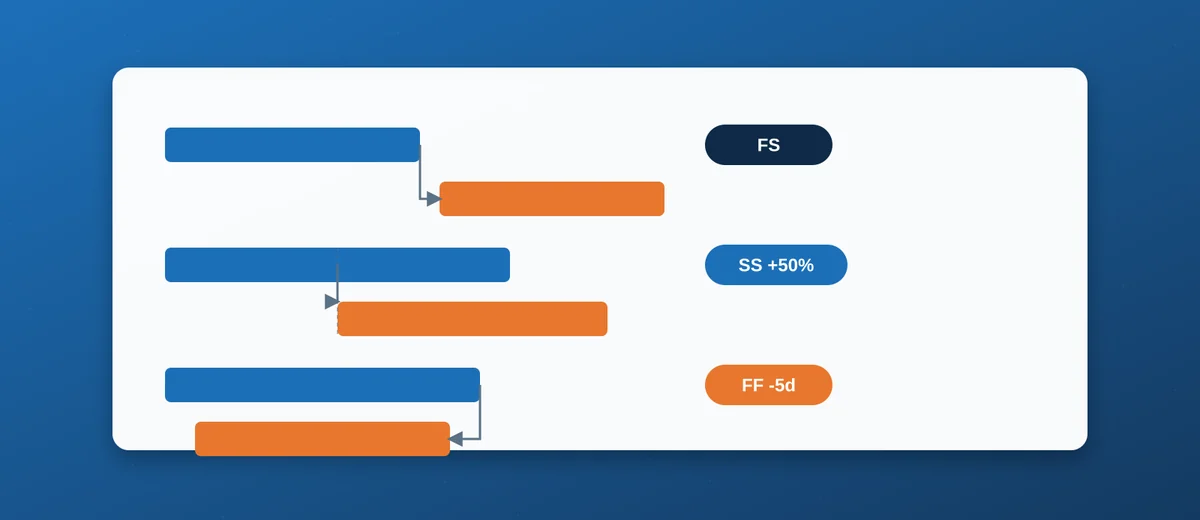
- Finish-to-Start (FS) — the successor cannot start until the predecessor finishes. This is the default link type and covers the large majority of real dependencies: you cannot paint a block before it is fabricated, cannot pressure-test a pipe run before it is welded.
- Start-to-Start (SS) — the successor cannot start until the predecessor starts. Used when two activities genuinely run in parallel once the first one begins, rather than waiting for it to finish.
- Finish-to-Finish (FF) — the successor cannot finish until the predecessor finishes. Used when two activities can run independently but must close out together, or when one activity's completion is what actually gates the other's completion, not its start.
- Start-to-Finish (SF) — the successor cannot finish until the predecessor starts. The rarest link type by far, mostly seen in shift-handover or just-in-time logistics scenarios ("the old system stays live until the new one starts"); most planners go an entire career without a legitimate need for it, and a schedule with several SF links is usually a sign the wrong link type was chosen rather than a genuinely unusual sequencing need.
Lag and Lead Time
A dependency type alone only says which event triggers the next task — it says nothing about the time gap between them. That gap is controlled by lag (a delay) or lead (an overlap, entered as negative lag), and it can be entered in two different ways depending on whether the gap should stay fixed or scale with the predecessor's duration.
Fixed Lag and Lead (Days)
A fixed offset is entered as a duration appended to the link type, e.g. FS+5d means the successor starts five working days after the predecessor finishes (a curing, drying or cooling period, for example), while FS-5d means the successor starts five days before the predecessor finishes — a deliberate overlap. This fixed value does not change if the predecessor's own duration is later revised.
Percentage-Based Lag and Lead
The more powerful, and more often misunderstood, option is a percentage offset such as SS+50%. Here the offset is calculated as a percentage of the predecessor's duration, so it automatically recalculates if that duration changes. SS+50% between a 10-day predecessor and its successor means the successor starts once the predecessor is half finished (day 5) — and if the predecessor later stretches to 14 days, the successor's start recalculates to day 7 automatically, with no manual re-entry needed. This self-adjusting behaviour is exactly why percentage lag is preferred over a fixed-day lag for any dependency where the real-world relationship is "starts partway through," rather than "starts a fixed number of days later" — the two situations look similar on a short schedule but diverge significantly the moment durations change on a long one.
Real Shipbuilding Examples
Block Erection and Seam Welding — SS+50%
Seam welding between adjacent blocks cannot start before erection begins (the blocks have to physically be in position first), but it also does not need to wait for the entire erection sequence of a multi-block section to finish — welding crews typically move in once roughly half the block positioning in that section is complete. Modelled as SS+50%, the welding start date correctly tracks any change to how long erection actually takes for that section.
Painting and Outfitting Overlap — FS-5d (Lead)
Final coat painting in a compartment is often scheduled to start a few days before outfitting is fully complete, once the remaining outfitting work has moved clear of the surfaces being painted. A FS-5d link captures this deliberate overlap explicitly, rather than the far more common (and misleading) alternative of simply shortening the outfitting task's duration to make the dates line up on the Gantt chart.
Insulation and Cabling in a Compartment — FF
Insulation and cable pulling in the same compartment can often proceed independently and in any order, but compartment close-out (and the next trade's access to it) depends on both being finished together. An FF link between the two, feeding into the close-out milestone, models this far more accurately than an artificial FS chain that forces one trade to wait for the other with no real physical reason.
How to Enter These in MS Project
In the Predecessors column of the Gantt Chart or Task Sheet view, a link is typed as the predecessor's task ID followed by the link type and any lag/lead: 12FS+5d, 8SS+50%, 3FF-2d. A plain task ID with no letters (e.g. just 12) defaults to a Finish-to-Start link with zero lag. For a link that needs review or discussion before committing, the Task Information dialog's Predecessors tab offers the same fields through dropdowns, which is less error-prone when typing several links on unfamiliar task IDs.
Common Mistakes
- Shortening a task's duration to fake an overlap instead of using a genuine FS-lead link — this corrupts the task's real duration/work data purely to force the Gantt bars to line up visually, and breaks the moment that task's actual duration needs to be tracked accurately (for progress reporting or EVM).
- Using fixed-day lag where percentage lag was actually intended — a fixed
SS+5dlink stops making sense the moment the predecessor's duration changes substantially, silently decoupling the "starts partway through" relationship the planner meant to model. - Defaulting everything to FS — a schedule built entirely from Finish-to-Start links, no matter how the real activities actually overlap, always overstates total duration and hides real opportunities to compress the schedule through legitimate, physically justified overlap.
Conclusion
The four dependency types plus lag/lead time are not a niche MS Project feature — they are the mechanism that lets a schedule actually represent how work overlaps and interacts in the real world, rather than forcing everything into a single-file queue of finish-then-start tasks. For the wider context of building a schedule structure these links sit inside, see Introduction to MS Project for Shipyard Schedulers and Getting Started with MS Project for Shipbuilding Schedules, and try these link types directly against the pre-built dependency structure in our downloadable Newbuild Master Schedule template.