
Why adding a second resource to a task sometimes shortens its duration and sometimes does nothing at all — Fixed Units, Fixed Duration and Fixed Work task types and the Effort-Driven scheduling switch, explained through the Work = Duration x Units formula.
Add a second welder to a one-week task and MS Project might cut it to half a week — or it might not change at all. Which one happens depends on a setting most planners never deliberately choose: Task Type, combined with whether Effort-Driven scheduling is switched on. Getting this wrong is one of the most common reasons a schedule's resourcing changes silently produce dates nobody expected.
The Formula Behind Every Task
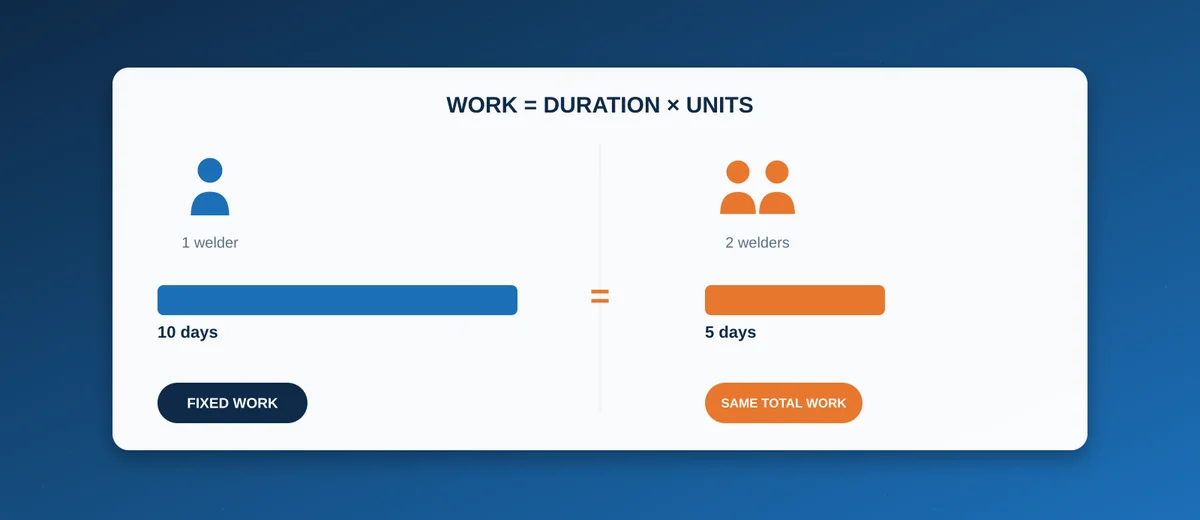
Every task in MS Project is governed by one simple relationship: Work = Duration × Units, where Work is total effort (person-hours), Duration is elapsed time, and Units is the assigned resource quantity (e.g. 2 welders = 200% units). Three variables, one equation — which means fixing any two determines the third. Task Type is simply the setting that tells MS Project which one of the three you want held fixed when something else changes.
The Three Task Types
Fixed Units (the default)
Units stays constant; changing Work recalculates Duration, and changing Duration recalculates Work. This matches most shipyard labour tasks well: a crew of a known size (Units fixed) works until the job is done, and adding more scope extends the schedule rather than silently reassigning crew size.
Fixed Duration
Duration stays constant regardless of resourcing changes; adding more people increases total Work but does not compress the timeline. This is the correct type for anything genuinely time-boxed rather than effort-boxed — a classification society survey, a curing or drying period, a tide-dependent trial window. No number of extra people makes paint dry faster or a survey finish sooner.
Fixed Work
Total Work stays constant; adding resources shortens Duration proportionally (double the crew, half the time), and is always effort-driven by definition. This fits genuinely divisible labour — a fixed quantity of welding, painting or cabling that really does finish faster with more hands, up to the point where crowding or access constraints make that assumption stop being physically true.
Effort-Driven Scheduling
Effort-Driven is a separate on/off switch (checked by default for Fixed Units and Fixed Work tasks, irrelevant for Fixed Duration) that controls what happens specifically when resources are added to or removed from an already-assigned task: with it on, total Work stays fixed and Duration recalculates as resourcing changes; with it off, adding a resource adds capacity without shrinking the timeline, which is rarely what was actually intended when someone assigns a second name to a task expecting it to finish sooner. The default setting matches intuition often enough that most planners never touch it — the trouble starts when a task type is used for something that does not match its underlying assumption, not from the effort-driven flag itself.
Shipbuilding Examples
- Hull block welding (Fixed Work, effort-driven) — a defined quantity of weld metres is genuinely divisible across a welding crew; doubling the crew realistically halves the duration, within the physical access limits of the block.
- Classification society survey (Fixed Duration) — a survey booked for a fixed window does not go faster by assigning more of the yard's own people to "help"; Fixed Duration correctly ignores resourcing changes for this task.
- Engine room outfitting by a fixed specialist crew (Fixed Units) — a specific commissioning team of a known size works until the scope is complete; if scope grows, the schedule should extend rather than MS Project quietly assuming the crew size changed.
- Paint curing (Fixed Duration) — a chemical/physical process with a fixed time requirement, completely insensitive to labour assigned.
Common Mistakes
- Leaving everything on the default Fixed Units without considering whether a task is actually time-boxed (should be Fixed Duration) — the most common single cause of a schedule where adding resources to a survey, cure time or trial window produces a nonsensical duration change.
- Assigning a second resource to a task and expecting it to finish sooner when the task type is Fixed Duration, or when Effort-Driven is switched off — the assignment succeeds, the crew shows as busier, but the bar does not move, which reads as a bug rather than the deliberate (if unintuitive) behaviour it actually is.
- Changing Duration directly on a Fixed Work task to "speed things up" — MS Project will instead reduce the resource assignment's Units to keep total Work constant, which is rarely the change the planner meant to make; the correct lever on a Fixed Work task is adding resources, not editing the duration field directly.
Conclusion
Task Type and Effort-Driven scheduling are not an advanced edge case — they are the mechanism deciding what actually happens every single time a schedule is re-resourced, which on a multi-year newbuild happens constantly. Matching each task's type to what is genuinely fixed about it — a crew size, a calendar-bound process, or a divisible quantity of work — is what keeps resourcing changes producing the schedule outcome the planner actually intended. This sits alongside the dependency and constraint mechanics covered in Task Dependencies in MS Project and Task Constraints in MS Project as core mechanics worth mastering before resource-levelling a full newbuild schedule (see Resource Leveling and Crane/Dock Capacity Planning).