
How MS Project's eight constraint types — from flexible ASAP/ALAP to hard Must Start On / Must Finish On dates — override dependency logic, when to use each one, and how misused constraints quietly break a schedule's critical path calculation.
A task dependency says how two tasks relate to each other. A constraint says something different and, once applied, more powerful: it pins a task to a specific date regardless of what its dependency logic would otherwise calculate. Constraints are necessary — equipment really does arrive on a fixed date, class surveys really are booked for a specific day — but used carelessly, they are the single most common way a schedule's critical path calculation quietly stops meaning anything.
Why Constraints Can Override Dependency Logic
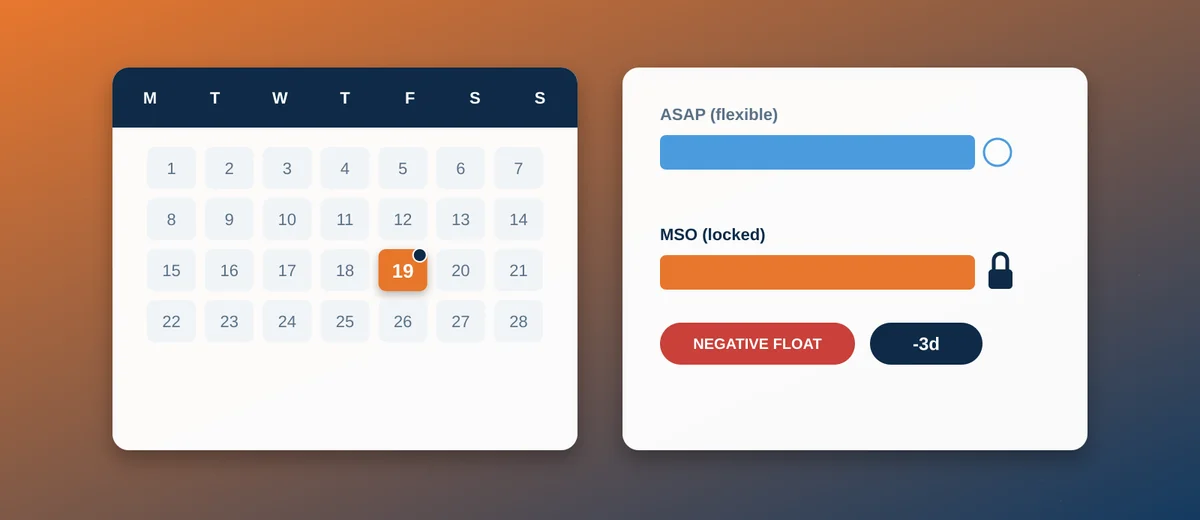
By default every task in MS Project is scheduled As Soon As Possible (ASAP) — it starts the moment its predecessors allow, calculated purely from dependency logic. A constraint replaces or restricts that calculation with a specific date. Depending on the constraint type, MS Project will either treat the date as a target the dependency logic must still respect, or as a hard rule the dependency logic gets bent around — which is exactly where an incorrectly chosen constraint quietly breaks the schedule's logic without any visible error.
The Constraint Types, Grouped by Flexibility
Flexible: ASAP and ALAP
As Soon As Possible (ASAP) is the default and should remain the constraint on the large majority of tasks in any well-built schedule — it lets dependency logic do its job. As Late As Possible (ALAP) pushes a task to the latest date that still allows its successors to proceed on time; genuinely useful for deferring a cost (a rental, a resource mobilisation) as long as possible without affecting the schedule, but it also removes that task's own float, and applying it broadly makes a schedule far harder to read at a glance.
Moderately Flexible: SNET, SNLT, FNET, FNLT
Start No Earlier Than / Later Than and Finish No Earlier Than / Later Than constraints set a one-sided boundary while still letting dependency logic operate freely on the other side of it. A Start No Earlier Than constraint tied to a confirmed equipment delivery date is a common, legitimate use: the installation task genuinely cannot start before the equipment is on site, no matter how ready the schedule logic says the preceding work is.
Inflexible: Must Start On / Must Finish On
Must Start On (MSO) and Must Finish On (MFO) pin a task to one exact date and override dependency logic entirely — if a predecessor slips past that date, MS Project will still hold the constrained task where it is (creating negative float, a visible warning sign) rather than pushing it out. These are appropriate only for genuinely fixed, externally imposed dates — a booked class survey slot, a contractual delivery date — never as a shortcut to "make the Gantt bar sit where I want it to."
How Constraints Interact With the Critical Path
A hard constraint (MSO/MFO, or SNET/FNET when the date is later than logic would otherwise calculate) can create negative float — a task showing less than zero days of slack, meaning the schedule as drawn is already logically impossible to achieve on time. Negative float is one of the most useful diagnostic signals in a schedule precisely because it is so easy to overlook: a Gantt bar rendered in the same colour as every other bar gives no visual clue that the date it sits on is actually unachievable under the current logic, and only the Total Slack column (or a filter built to surface it) reveals the problem.
Common, Legitimate Uses in Shipbuilding
- Major equipment delivery (main engine, generators, thrusters) — a Start No Earlier Than constraint on the installation task, tied to the confirmed delivery date in the procurement schedule.
- Classification society survey dates — surveys are booked slots, not flexible outcomes of upstream logic; a Must Start On constraint (or, more defensively, Start No Earlier Than paired with a deadline flag) reflects that reality.
- Sea trial weather/tide windows — certain trials can only happen within specific tidal or weather windows; constraining the trial task to that window, rather than letting it float freely, keeps the schedule honest about a real external limitation.
- Contractual delivery date — typically modelled as a deadline (a visual flag with no logic-overriding effect) rather than a hard constraint on the delivery milestone itself, so that slippage still shows up as negative float against the deadline instead of silently disappearing into a pinned date.
Common Mistakes
- Constraining tasks to "lock in" a schedule that looks right today — every Must Start On applied for convenience rather than a genuine external fixed date is a task that will no longer respond correctly when an upstream predecessor slips, silently disconnecting that part of the schedule from reality.
- Confusing a constraint with a deadline — a deadline (Project ribbon > Deadline) flags a date and shows a warning indicator if it is missed, without ever overriding dependency logic; a constraint actively overrides the calculation. Most contractual dates should be deadlines, not constraints, precisely so the schedule keeps calculating honestly around them.
- Never auditing constrained tasks — a schedule accumulates constraints over months of edits, and without periodically filtering for "Constraint Type is not ASAP" (a built-in filter), nobody notices how many tasks are quietly running on pinned dates instead of real logic until the critical path stops making sense.
Conclusion
Constraints exist because not everything in a shipbuilding project is determined by internal task logic — equipment arrives when it arrives, surveys are booked when they are booked. Used sparingly and for genuinely external fixed dates, they make a schedule more accurate. Used as a shortcut to make a Gantt chart look the way someone wants it to look today, they quietly disconnect the schedule from the dependency logic that is supposed to make it trustworthy. For how these constraints sit alongside the dependency types covered separately, see Task Dependencies in MS Project, and for the broader baseline/tracking discipline they support, see Getting Started with MS Project for Shipbuilding Schedules.